HEADQUARTERS
Insignary Inc. 181 Bay Street, Suite 4400 Toronto, Ontario, Canada M5J 2T3
Email: info@insignary.com


It is one file. There is nothing to install. The check only reads files: it never runs what it finds and sends nothing over the network (only --url and --clarity connect, to the address you give). Nothing on the server changes unless you use --fix. Works on Alpine too.
This web check covers PHP2Shell only. It reads the PHP version a website already reports, from the outside. Node.js does not report its version to visitors, so Node2Shell is checked on the server with insignary-chk.
We only read the PHP version your server already shows. We do not attack or probe your site, and we do not store the URL you enter.
Enter a URL you own, then press Check.
We send one ordinary request and read only the version the server reports.
tar xzf insignary-chk-0.7.0-linux-x86_64.tar.gz
cd insignary-chk-0.7.0-linux-x86_64
sha256sum -c SHA256SUMS        # should report OK for insignary-chk
One file. There is nothing to install.
sudo ./insignary-chk                              # quick check (seconds)
sudo ./insignary-chk --deep --html report.html    # deep check, with a report you can open in a browser
Without sudo it still runs, skips files and processes it cannot read and tells you how many it skipped.
Start with the To do list at the end. It is sorted most urgent first.
| Quick check (default) | Deep check (--deep) | |
|---|---|---|
| Files | Where PHP / Node.js / Brotli are normally installed, every file a running process uses, the project files of running Node.js / PHP apps, then the rest of the disk by file name for PHP / Node.js / Brotli copies that apps carry themselves (up to 20 seconds) | The whole disk, and project files (package.json, Dockerfile, requirements.txt, composer.json, ...) everywhere |
| Running containers | Not checked | Every running container is checked too |
| Time | Seconds (up to about 20 s more on a large disk) | Longer (depends on the disk and the containers; containers are read in parallel) |
A quick check also finds copies outside the usual places (for example a Node.js bundled inside a Python package in a home directory) by file name. It does not read project files outside running apps, does not check containers, and stops the name search after 20 seconds (the result says so). Run a deep check at least once per server.
./insignary-chk --all-containers            # every running container
./insignary-chk --container web             # one container, by name or ID
./insignary-chk --image myapp:latest        # an image on this host
These use the docker (or podman) command already on the server. An image is not started and not downloaded: the tool creates a stopped container from it, reads its files, and removes it.
Quick check of the public node:22-alpine image, November 4, 2026.
$ ./insignary-chk --image node:22-alpine --html report.html
insignary-chk 0.7.0 — quick check · read-only · no execution · nothing sent
Read image node:22-alpine via docker export
Target:  image node:22-alpine
Mode:    quick (standard install locations + PHP / Node.js / Brotli files anywhere in the filesystem). Project files everywhere and containers: --deep

Node2Shell (CVE-2026-111497)
  /usr/local/bin/node        Node.js 22.23.3        Likely vulnerable      fixed in 22.23.4

PHP2Shell (CVE-2026-109618, CVE-2026-109619)
  No PHP binary found                               Unable to determine

Project files (declared versions; not counted in the Summary)
  /opt/yarn-v1.22.22/package.json
                             Node.js >=4.0.0        Unable to determine    range or alias; check the installed version

Running now: an image is not running (files checked only). For a running one: --container NAME

Summary: Likely vulnerable 1 · Unable to determine 1
To do (Act now 0 · Fix soon 1 · Review 1):
  1. [Fix soon] Rebuild image node:22-alpine with Node.js 22.23.4 or later (now Node.js /usr/local/bin/node (22.23.3))
  2. [Review] /opt/yarn-v1.22.22/package.json declares Node.js >=4.0.0: range or alias; check the installed version
Saved: report.html
(closing notice shortened)
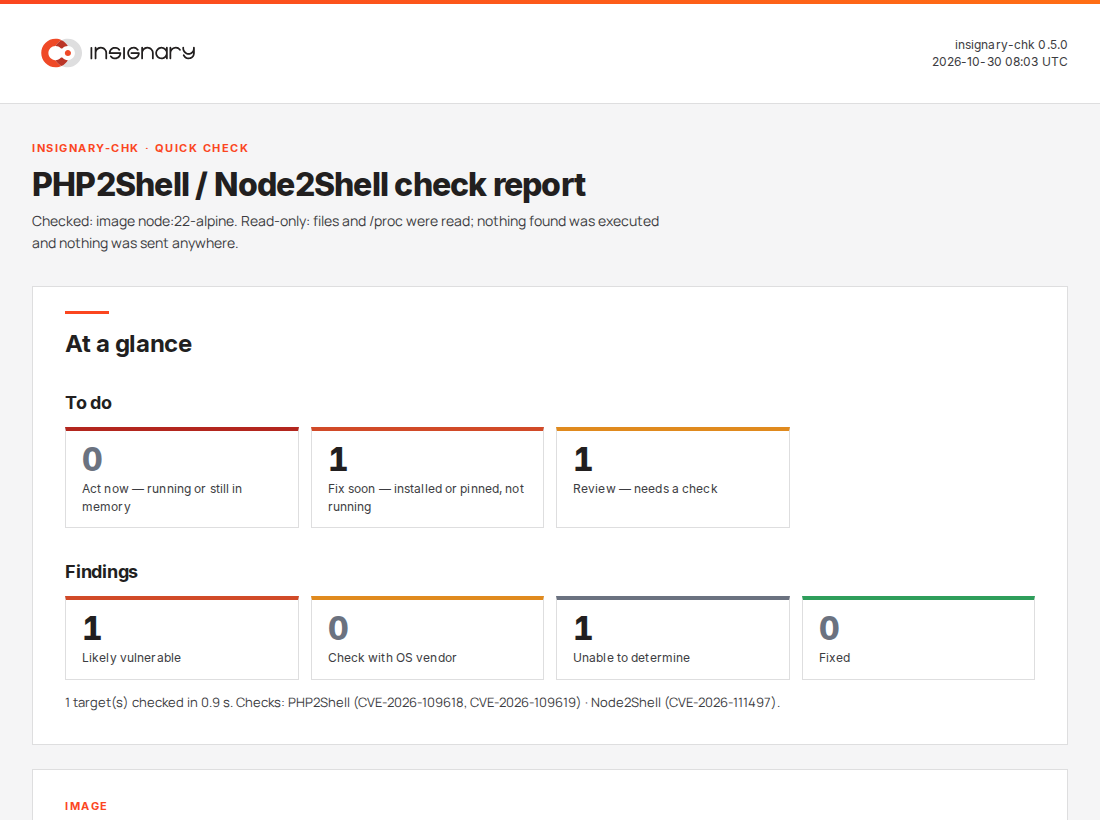
Start with the To do list at the end. It is sorted most urgent first.
A vulnerable file is in use by a running process (worst when that process listens on a network address), or a process still holds an old copy of an updated file in memory and needs a restart.
A vulnerable file is installed but not running, or a project file pins an affected version. When processes are not checked (a folder or archive), the line says "running state not checked".
Needs a check by you: OS vendor advisory, a version the tool could not read, a version range in a project file, an app that decompresses Brotli request bodies.
| Branch | Fixed in | Note |
|---|---|---|
| 8.5 | 8.5.12 | Released Oct 21, 2026 |
| 8.4 | 8.4.27 | Released Oct 21, 2026 |
| 8.3 | 8.3.36 | Released Oct 21, 2026 |
| 8.2 | 8.2.35 | Branch reaches end of life on Dec 31, 2026 |
| 8.1 and older | No PHP release | Check whether your OS vendor has shipped a fix |
Source: php.net release announcements, October 21, 2026. Linux distributions often backport the fix and keep the upstream version number, so look at the package build, not the version alone.
| Release line | Fixed in | Note |
|---|---|---|
| 26.x | 26.12.1 | Released Oct 21, 2026 |
| 24.x | 24.22.1 | Released Oct 21, 2026 |
| 22.x | 22.23.4 | Released Oct 21, 2026 |
| 25.x, 23.x, 20.x and older | No Node.js release | End of life: move to a supported release line |
Source: nodejs.org, October 21, 2026 security releases. The same fix shipped in Brotli 1.0.10, 1.1.1 and 1.2.1. If your Node.js came from a Linux distribution package, it may use the system Brotli library, so check your distribution's security advisory as well.
PHP is found inside a content management system, an internal tool, a vendor's web console, a network appliance and the base layer of a container image. Each of them pins its own version, and most of them do not tell you which one.
PHP2Shell sits in the PHP runtime, not in application code, so code reviews will not find it. An application served by an unpatched PHP version can be exposed however clean its own code is.
The official WordPress image we examined carries PHP twice: the command-line binary and the Apache module that serves web requests. Running php -v finds the first and may miss the second.
A patched Ubuntu 24.04 build still reports PHP 8.3.6. A check that compares version numbers alone, including one that reads a response header like this one, would call it vulnerable. Only the package build shows the fix.
insignary-chk checks one Linux server and its containers, for three CVEs. Maintaining Software Bills of Materials (SBOMs) for your applications and critical servers lets teams answer “Are we affected?” for everything they build and buy.
Insignary Clarity's patented binary SCA builds an SBOM from compiled code: applications, embedded firmware, IT infrastructure and containers. That covers the software you buy as well as the software you build.
Insignary Clarity SC brings results from Clarity, Clarity AIR, third-party SCA tools and imported SPDX or CycloneDX SBOMs into one platform, so the organization can answer one question: which systems are affected?
Clarity SC synchronizes CVE data daily and maps new CVEs to the SBOMs you already have, then emails project owners, without rescanning systems and projects.
export CLARITY_TOKEN=...                      # or CLARITY_EMAIL and CLARITY_PASSWORD
sudo -E ./insignary-chk --clarity https://clarity.example.com --html report.html
With --clarity, insignary-chk sends the files it flagged to your own Clarity server, under your account, waits for the binary analysis and shows file by file whether Clarity confirms the version and the CVE answer, with the other security issues Clarity found in that file. The terminal, the JSON and the HTML report all show it. Credentials are read from the environment only and are not written to any output. Nothing goes through Insignary.
PHP2Shell is the name for two critical vulnerabilities in the PHP runtime, CVE-2026-109618 and CVE-2026-109619, that can allow unauthenticated remote code execution. The PHP project released fixes on October 21, 2026.
Node2Shell is the name circulating online for CVE-2026-111497, an out-of-bounds write in the Brotli decoder that Node.js bundles. Crafted Brotli data can crash the process, leak memory or allow remote code execution. The Node.js project released fixes on October 21, 2026.
PHP 8.2.35, 8.3.36, 8.4.27 and 8.5.12, all released on October 21, 2026. The PHP project says upgrading is the only complete fix. PHP 8.1 and older no longer receive official releases; check whether your OS vendor has shipped a fix.
Node.js 22.23.4, 24.22.1 and 26.12.1, plus any newer patch release of those lines. Node.js 25.x, 23.x, 20.x and earlier are end of life and get no fix. The same fix shipped in Brotli 1.0.10, 1.1.1 and 1.2.1 for other software that uses the Brotli library.
The version alone does not make an app exploitable. Brotli data that an attacker controls has to reach the decoder: for example a server that decompresses request bodies sent with Content-Encoding: br, or an app that fetches a Brotli response from a server an attacker controls.
Only files: where PHP, Node.js and Brotli are installed, the files that running processes use, project files such as package.json, and, with the container options, the files of your containers. It never runs what it finds and sends nothing over the network, except a request to the address you give with --url, and, with --clarity, the flagged files to your own Clarity server. The result is based on version numbers and, for packages from your Linux distribution, the package changelog.
Only the PHP version your server already reports in the X-Powered-By response header (or, if that is not sent, the Server header). It does not attack or probe the site and does not store the URL. Servers can change or hide this header, and Linux distributions often backport the fix while keeping the old version number, so the result is a quick check, not a full assessment.
It can be. The flaws are in the PHP runtime, so an application served by an unpatched PHP version can be exposed regardless of the security of its own code. The PHP project lists installations serving web requests as at risk: PHP-FPM, Apache with mod_php, php-cgi, FrankenPHP and LiteSpeed.
Use binary software composition analysis, which identifies open source components and their versions from compiled code, firmware and container images without the source code.
No. An SBOM tells you where a vulnerable component is. Stopping the attack still means upgrading or isolating the affected service.
Free tool. You are responsible for how you use the results.
More background: What Is PHP2Shell, and Are You Affected?
Send us a binary, firmware image or container you would like an SBOM for, and we will show you what Clarity finds.


